Thursday, 2 June 2011

How to add Google Adsense in blogger Site Feed

By this useful article you teach that how to add Google Adsense in blogger Site feed. I have received emails from some new bloggers and other friends they said about adding of Google Adsense in bloger Site feed with simple and easy steps. Because my The Blogger School is very popular its simplicity and  used with easy English language for the understanding of visitors and readers.  When visitors read your posts through Site feed and you may be losing page views that could be paying you money through your AdSense account. You can read also about RSS feeds like: add feedburner blogger,create feed blogger,feedburner widget,blogger site feed.

So it is necessary that add Google Adsense accordingly. I describe that by utilizing of  Google AdSense for RSS Feeds, you can make money from your blogger blog  posts through RSS Feeds. Further I advice that improve your Google Adsense earnings showing ads in RSS feeds. Google AdSense for RSS Feeds works by conveying ads that are pertinent to your contents and your visitors. Now I give you some useful tips and tricks about applying of Google Adsense in RSS Feeds to improve your earnings. Now see the following instructions with carefully.


1.    Now go to www.feedburner.com account and open it with your gmail email address, if you did not make yet a feedburner click here or you have already made feedburner account go to Monetize tab  and click Sign in to Adsense for more guidance see the picture has given below:


2.     After that go to Adsense setup and select Adsense for Feeds and click there for more guidance see the picture has given below:


3.    I suggest that now configure the ad Ad type, Position, Post length, as you want to show on your feeds see the following picture:


4.    Now search  bottom of the page and click on burn new feeds then you will see the following picture:


5.    In view of the above picture type URL of RSS Feeds in the above picture and press next button and you will show the following picture.


6.    Complete the above procedure and then a message shown that your feed content source has been verified and then click on next button and look at the picture below finally message appeared that use new feed with new Adsense feed.


ANOTHER EASY METHOD TO INSERT ADSENSE IN RSS FEEDS
This is very  simple method to add Google Adsense in RSS Feeds, if you did not understand the above procedure read the following instructions.

1. Go to www.blogger.com and first Dashboard then Monetize after the click on Adesense for Feeds you will see the following picture


2. Now click on the next button Google Adsense would be appeared on your RSS feeds for more guidance see the pictures has given below:


I hope you have understood the above procedure with carefully if you got any problem call me or contact me, if you like this  article or suggest me please leave your comments.  

Wednesday, 18 May 2011

Seven Secrets about make money with google adsense

By this most useful article Seven Secrets about make money with google adsense is very profitable for new blogger owners and I have unveiled all secretes about it. Presently my blog Blogger School is providing free training to all blogger users in all over the world. I am trying my best to give original and useful articles to all visitors and readers according my vast experience in the field of blogging. I am not doing blogging for make money but my zeal and enthusiasm in this filed. In this regard my blog is going on good position and I am very thankful to all visitors from all over the world they have given good response to me. All visitors and readers already known that I am Asian and use simple English and simple words which are well to understand for all bloggers.  Further I discuss that do you  know well that Google Adsense is the most uppermost paying ad system in the World of Web. I have received lot of emails from visitors all over the world they are facing lot of problems to get approval of Google Adsense by using free blog blogger blog. To see the requirement of all visitors and readers  and blogger owners this article disclosed all secrets, if you will read it well and implement on these instructions you will success to get the permission of Google Adsense urgently. Nowadays every blogger wanted to have a Google Adsense grant account, it keeps provide you frequent revenue every month. Before applying for Google adsense permission read Google Adsense TOS with carefully and also read another related and useful article How to get Google Adsense approval  quickly and easily or more guidance. Now I will disucss the following main and important points step by step read with carefully. For more information you can read also like google adsense secrets download,google adsense blog, make money with google adsense,google adsense information,google adsense tutorial videos,adsense tips.

1.   Apply one time not hurry up

Constantly apply one time for Google Adsense Account, normally  Google team  respond in 5 to 6 days. If you put forwarded your application to Google Adsense team and you do not  get any grant or refusal email from Google. I think you should be waiting and avoid applying time to time and not disturb to Google team to send more emails. In this regard Google team will give you reply email about your application  refusal or accepted.

2.    Check following points your blogger is correct

i. Your free blog blogger is not under construction condition
ii. Your blogger posts not less than 50
iii. Read Google TOS before applying
iv. Save your free blog blogger from Duplicate stuff
v. If you take any stuff from online give reference or take permission from owner of the stuff otherwise you banned and Google will not consider your application
vi. Use new Gmail Account and do not use other services emails.
vii. Make sure that your free blog blogger is 06 months old

3. Write articles in English Language

 English is popular language in all over the world Google prefer English specially before applying for Google Adsense, keep in mind that the English of your articles are correct you are not getting spelling errors and Grammatical mistakes. One more important thing is that your articles associated with your blogger titles, really this is very serious mistake correct it before applying.

4.    Update free blog blogger daily

Now you have applied for Google Adsense do not sit silent start more blogging and write minimum one artice daily should be consisting on original material and profitable for others and also this is good way to promote visitors and readers.

5.  Make sure your Identity is correct

Now you are going to get sanction for Google Adsense, if you are new how you fill application form, please read this useful article how you apply for new account of Google Adsense. Further check that you have written your home address is correct or not fake the address will be reviewed by google adsense team. One more thing is important is that your free blog blogger address and your Google Adsenese account address should be match.

6.    Do Not post Duplicate Material on free blog blogger

You are new blogger you want to get your approval of your blogger blog urgently and quickly. Write your own contents and do not copy from other blogs and Web sites. Google team is very active if you have got taken any duplicate material you will be banned and your application will be rejected. When you are applying Google team checks your contents and articles with carefully. This is main reason of rejection of application you are using duplicate material because it  is totally wrong and is not allowed, therefore if someone applies as a new publisher account for a new blogger blog  with copied content then it would be rejected at a time. Save your blog from duplicate stuff.

7.    Do not apply for your friends and others from your System

This is your main mistake I clear that you should never apply for a Google Adsense Account for your friends or others from your own Computer.  Also the application page would even record your IP address, therefore to be on secure side forever recommend the individual who is looking to get an Google Adsense Account to apply for the same themselves. Let’s go the present rules for the application of your new account as per Google Guideline. Remember that you can not apply from one system or computer for Google Adsense because only one IP address allowed for one Google Adsense Account, if you did not care in this regard your application will be rejected, check that you have not applied before from same IP address.  

I hope the above  (seven) secret points will be very useful  for new free blog blogger owners and visitors who are interested to get Google Adsense permission quickly. If you like this article please leave your comments.

Friday, 29 April 2011

How to apply for Google Adsense through blogger blog

Summary: This useful article teaches you that how you prepare application  for Google Adsense and how  make money from blogger blog and also step by step suggestions and tips  for Google Adsense


By this useful article you teaches that how to prepare application  for Google Adsense Account for free blog blogger and make money easily. I think Google Adsense Program is just very profitable for every body that has a free blog blogger on good contents. Even if your free blog blogger is just for information you can still participate and make money with Google Adsense it is an excellent method to make money.  If you are simply looking for ways to add additional make money system to your free blog blogger then Adsense is perfect for that purpose too and easy. Google Adsense program is getting so popular in all over the world everybody are creating blogs just to display the ads and profit from Google Adsense. You do not have Google Adsense account yet, now time you should have one, But, we all knew that not all who applied for an Google Adsense account gets approved. In my experience I advice you that the easiest and quickest way for your Google Adsense Account Application to be approved is to create  free blog blogger, if you have not free blog please click here. You are new and now have completed your free blog blogger see the instructions on this article carefully  for more guidance look at the following procedures has been given step by step suggestions easily. 

1.  If you have a gmail email address click on this lick https://www.google.com/adsense. After the Adsense page opened click “Sign up now” button more guidance look at the picture has given below:


2.    On the next step you should be completed the Adsense registration form.  There three form sections must be completed on this page with carefully for more information look at the picture has given below:


3.      This portion consisting on you contact Information now select your account type and enter the valid information on the form (payee name, address, phone). This data be used to received when you received your payment for more guidance look at the picture has given below:


4.    Read the Google Adsense policies and you must agree all Adsense policy. Check all options on this section for more information look at the picture given below:


5.    After all data complete click “Submit Information” button and after submit Application form to the Google and Google will review  your free blog blogger  and your registration form. Usually it needs 1 to 5  days for more days  to get your Adsense registration approved or rejected.  Google will send an email to your inbox if your Adsense approved or rejected.

In view of the above if you are new in Google Adsense and you are owner of free blog blogger and you have 60 and above good contents on your blogger blog do not hesitate fill the above form and submit to Google for approval and make money from your blogger blog  easily, because blogger  blog will be approved easily from Google management if your contents are original and informative.

This useful article will be informative for new blogger owners and others, if you like it give me suggestions and leave your comments.
 

Thursday, 28 April 2011

Increase Google Adsense Revenue to use blogger

By this useful article you will teach that how you Increase Google Adsense Revenue to use blogger  to setup Google Adsense I think this is very easiest methods to make money from your free blog blogger. Google provide ads to your blogger blog  based on its content. More peoples clicks on ads and you can earn more and more. You earn a percentage of what the advertiser pays per click and the rest goes to Google. Now I guide you step by step how you display Google adsense secrets if you want to know about Google adsense secrets click here and how you setup Google adsense account in free blog blogger look at the following main points. You can read more and take information about Google Adsense like:google adsense revenue download,increase google adsense revenue, google adsense tips,google adsense revenue sharing,google adsense revenue per click,google adsense revenue estimate,google adsense login,google adsense blog.

1.    Setup Google Adsense account on free blog blogger

I think Google Adsense Program is just too good an opportunity to pass up. Even if your free blog blogger  is just for information or blogging purposes, you can still participate and make decent money with Google Adsense.Google Adsense is an excellent way to earn money on the side. Even if you earned as little as $10 in a month, it would more than likely cover some or all of the costs for your blog.  Or, if you are simply looking for ways to add additional revenue to your free blog blogger  then Adsense is perfect for that purpose too. Google Adsense program is getting so popular; people are creating blogs just to display the ads and profit from Google Adsense alone So, if you do not  have an Google Adsense account yet, it's about time you should have one, now. But, we all knew that not all who applied for an Google Adsense account gets approved.

In my expience I advice you that the easiest and quickest way for your Google Adsense Account Application to be approved is to create a blog first at go to www.blogger.com which is Google's own blogging service site, if you have 20 and above quality  content on your free blog blog blogger you can get adsense account easily. You are new  and now have comepleted free blog blogger click here and apply for Google adsense account.

2.   How you setup up Google Adsense Ads for blogger blog
 

You have approved your Google Adsense account  from Google management and now you are ready to setup ads for your free blog blogger. On one occasion inside, go to the “Google AdSense Setup”tab". Click “AdSense for content” to set up text or image ads. There are a lot of types of ads you can make but let’s stay it easy, and just attach to image and text ads since these are what you will you use a lot more than the other ad formats. When you will click “AdSense for content”, check the “ad unit” option. This allows you create an ad that either shows as text as you see to the right or as an image, or both. Attach to text ads here select “text ads” as these have been proven to get the highest numbers of clicks.  Click “continue”.

3.   Choose the format for Google Adsense

Look at the format of the ad is the size and shape of the ad. To view available formats, click the “ad formats” options. If you check the drop down box for ad formats to the right, you will see “optional” these are the ads that have been proven to do well especially the 336x280 format.

4.   Pick the colours For Google Adsense 

The colour should be match with your  blogger templates. Consequently if you have black text on a white background always the best colour combination for a blogger tempalte, Select : html colour codes (000000) and (ffffff) the default colour, background: white, text: black, URL black as you like but perceive the design of your blogger template accordingly . The colour mixture where the ad blends into the free blog blogger has been proven to obtain the most clicks.  You can see the title is the colour you normally see for URLs so that someone knows to click on the ad because it looks like a link really this is very great fun of your own technique.

5.  How you select the fonts of Google Adsense

Now you should be check with carefully the the fonts of  of your free blog blogger  I think Arial , medium is too easier to read. This next part is quite important is that you set up channels.  The channels permit you to label each ad unit so can see which get the most clicks. When you recognize that a exacting ad performs well in a particular position, you identify you have a winning formula and can use it more often to increase your revenue.

6.   Add a channel in Google Adsense

Now it is very easy to click “add a new channel” here and name your ad something significant that will distinguish it from your other ads i.e. “blogger.com, 336x280, top right”. Click “continue”. Use this same label as the AdSense unit name.

7.   How you get Google Adsense code for blogger blog

Now it is very easy click “Submit and get code” and take code paste it wherever you want it to appear on your free blog blogger.  If you want to add your adsene on right place  click here  for more information. After adding Google Adsense  have patience at about 10 minutes the ad will be appeared on your free blog blogger. 

8.   How to make money  from Google Adsense

This is very great tip and also very important  that begin to make keyword rich pages containing well researched, profitable keywords, and get lots of high quality links to your free blog bloger. If you concentrate only on top paying keywords, you will face an awful lot of tough competition. What you want are keywords that are high in demand and low in supply so do some careful keyword research before you build your blogger posts. If you want more tips about make money by Google Adsense click here.  Increase your quality content day to day and you have more quality content and more your traffic comes on your free blog blogger. The most very important, top Adsense make money tips have to be based on the content that you carry on your Adsense blog. The problem with most Adsense affiliates is that they just slap content onto a blog, put up their Adsense ads and then wait for something to happen. When nothing happens they then get very busy looking everywhere for top Adsense make money tips that will work some magic into their earnings. Meanwhile they never think to touch their content. One of the top Adsense make money tips should be that you touch, adjust and add content all the time, to make money from Adsense. If you have implemented on the above tips you can make money more and more to use Google Adsense like others.

This article will be very useful for new bloggers and others, if you like it or give me suggestions, please leave your comments.

Monday, 4 April 2011

How to take Google Adsense Account Approval for blogger

By this useful article How to take Google Adsense Account Approval for blogger. I have given very useful tips and tricks and tips. This is not easy to get approval using of free Blog or Website. Google Adsense gives an opportunity of earning money honestly anywhere in the world. Google Adsense is an ad serving program which is run by Google. If you want to enroll in this money making progrmme, you have need a website or Blog. You can also join a Adsense revenue sharing sites get adsense approval through these sites for blogs. At this time Google has been strict on the new applications for the Adsense. 

There are some useful tips for getting Adsense approval. If you have implemented on my tips and points you will be success to get Google Adsense account is totally free.  Every Blogger has dream to earn more money from free blog. Everyone wants to earn the maximum from his free blog. While there are many ways of earning from a blog the most preferred method is using Google Adsense and direct ad sales. While Google Adsense is the best earning solution and one can earn a good amount from Adsense, many people find it difficult to get approved into Google Adsense account. Many lose hope just after one attempt. You can see also more about Google adsense like adsense approval trick,adsense approval tips, and need some assistance pls adsense etc.

In order to maintain quality in Google Adsene, Google  have to refuse some applications some times. A highly respected company can not just approve applications blindly as they also need to take care of their advertisers. Though the Adsense team only rejects the applications which are fake, duplicate or on which displaying Adsense ads will cause harm, sometimes even genuine and non duplicate applications get rejected. I know how bad it feels to get rejected. Now I give step by step suggestions and follow them how you get approval from Google.

1. Use your Original Names and not use Nicknames

While this mistake is infrequently done, there are a few people who unwittingly use their nicknames while registering Google Adsense. While there is nothing in a name, I feel using a nickname may get your account abandoned. I always suggest using your real names.

2.   Apply Only One time for your own Account

If you have two blogs both not having Google Adsense, do not apply for two Adsense accounts for both blogs. If you have submitted an application and have not received the approval or rejection e-mail, please do not apply for another account. I am sure the e-mail will come. Though it will take time, it will come. Normally it takes about 3 or 4 days, but it may take more time if there are some holidays. Apply only once. You should have provide a valid and full address with Home number

3.  Make Your free Blog  Blogger consisting on quality contents
 
Adsense team only approves the sites which have good content both in terms of quality and quantity. They both should be in equal level. Concentrate on both the issues. I suggest focusing on “Quality” first because I feel people see the quality of the article and not the number of articles in your free Blog Blogger.

4.  Solve Traffic Problems
A Free blog Blogger with no or very less traffic is not at all suitable for Google Adsense. How can a Free Blog  Blogger with no visitors make money with Google Adsense. I mean if Google Adsense team will approve each and every account (Even sites with very less or no traffic at all).  I think it will be useless. It will only increase the database size only and useful for Google Adsense. Make sure that you can get more traffic before   you applying for Google Adsense.

5.  Make Your Website or Blog with Professional Look

A Website or Blog with unprofessional and untidy look will not get approved in Adsense. Along with the content the site style and look also matters. Please keep in mind following tips and suggestion.

1.  Use light colors and save your Blog for Website from unnecessary colors and layouts.
2.  The design of your website is to be very simple and easy.
3.  Insert links to all your pages with each other or given reference.
4.  Ensure easy navigation properly.

6.   Make your Free Blog Blogger simple and Informative

I have already discussed that Blogger Blog is very simple and easy to earn money online. Your Blog Blogger have minimum 10 posts and each post have minimum 400 to 500 words for better results. Your blog Blogger have older more than 03 months and you should have add your profile "about me" page on your blog and it should be completed and finally Make your Blog Blogger informative and useful for others and its layout should be easy and good looking Search Engine friendly template if you want Search Engine friendly template you an see my article SEO friendly blogger templates.

I hope this useful article helped you follow the tips mentioned above I give ensure you that your account will be approved very quickly. Just follow all the tips and then apply this is very useful. If everything goes right, your application will be approved quickly without further delay. If you have any problem getting Google Adsense account please contact by comments  to this article.

Tuesday, 29 March 2011

Adding Google Adsense between blogger posts

This useful article about Adding Google Adsense between blogger posts is very profitable for new blogger owners. You are more likely to generate revenue with Google Adsense if your advertisements stand out. With Blogger Blog you can place Adsense between your Blogger Blog posts as a Blogger gadget. This is called inline ads. Having inline advertisements is a great way to make them stand out to your readers. To set up inline Google Ads on your Blogger Blog and follow following main tips and tricks to add Google adsense between the Blogger Posts. Now you can read  and take more information about Google Adsense like:google adsense tips,google adsense pay,google adsense rates,adding google adsense,earn google adsense.

1.     Now I advice that go to www.blogger.com and click on the Layout tab and click on the Page Elements link. Choose the Edit link in the Blogger Blog posts section. Start out by creating a Google Adsense account if you do not already have one login to your blogger account. Click Layout next to the Blog that you would like to edit. This will bring you to the Blogger layout page where you will be able to see all of the widgets that you have added to your Blogger Blog. Click the button that says Edit at the bottom of the Blogger Blog post section look  the following picture given below: 


2.      This will bring up a new box where you will be able to edit the settings of your Blogger Blog posts. Scroll down and click on the box that says "Show Ads Between Posts". This will open up a new section on this box where you will be able to edit the Google Adsense ads that will be placed between your Blogger Blog posts. For more information look at the picture given below: 


3.     Once you are finished, click Save. View your Blogger Blog and if this was done correctly, you will see Google Adsense ads between your Blogger posts.

4.      In view of the above if you to setup colors of Adsense according your Blogger template you can do this easily and also change size of the ads according your choice and then click on Save Changes.


I think that is all right there is to it. Good luck earning more revenue on your Blogger Blog and enjoy with inline Google Adsense ads.


The above useful article will be profitable for new bloggers and others, if you like it  or  want to give me suggestions please leave your comments.

Monday, 28 March 2011

Adding Google Adsense in Blogger Sidebar

By this useful article about adding Google Adsense in Blogger sidebar is very useful for profitable for new blogger owners. If you can do something you enjoy making money. Thanks to Google AdSense, people of the world who love to Blogger blog have an enjoyable alternative to  exra earn . With Google Adsense, you obtain revenue each time an ad is clicked from your Blogger Blog. Not only that AdSense is monetarily helpful, it is easily customization. In fact, you can dictate to where the Google Adsense will show up in your Blogger Blog. This method, you can control the overall look of your Blogger Blog, which could help to boost traffic to your Blogger Blog. Now I guide you step by step how you to add Google AdSense to the sidebar of your Blogger blog and also you can read more about Google Adsense like google adsense tips,google adsense pay,google adsense rates,adding google adsense,earn google adsense.


1. Sign in to your AdSense account. In case you still do not have Google AdSense account, you can sign up Google Adsense Account. There is a some days waiting period before your application is approved.


 2. Select the Google Adsense layout. It should fit in the Blogger sidebar. The best layouts you should choose are small rectangle, vertical banner, wide skyscraper, skyscraper, and button. Choose your desired color palette, as well. AdSense will give you a preview of the palette so you can see how your blog will look like.

3. Copy and past the code. Generate the AdSense code after setting your preferences. The code can be seen at the bottom of the webpage. Highlight the codes and then copy them. Paste the code to Notepad or similar application.

4. Sign in to www.blogger.com and then select your Blog that you want to change the Google AdSense layout. Click on the template tab of that Blogger Blog. Copy the blog's Blogger template. Paste it in another Notepad file.

5. Look for the sign. Find the following codes in the Blogger template:
 
<!-- Begin #sidebar -->
<div id="sidebar"><div id="sidebar2">
 
6. You might need to look for it near the bottom of the code. Copy the AdSense code that you have pasted a while ago in Notepad. Paste the AdSense code right after the code mentioned above.

7. Copy and paste the edited template to Blogger. Delete the template code on that specific Blogger code. Copy the edited template, that one with the Google AdSense code, and then, paste it on the Blogger template box. Republish your Blog. Save the changes you made with the template. Republish your blog and see if this trick works.

8. This how to guess that you are using Blogger Blog Classic Template. Layout enabled templates can add AdSense to the sidebar by adding a new Google AdSense page element to the sidebar. Dragging elements to your preferred location is another alternative to control where the ads will be posted.

9. This technique may be easier but you can get lesser revenue with this. Goggle gets a percentage for hosting the ads when you use the AdSense page element option. Editing the code can be trickier, though. But at least, you get the rewards of your hard work. After all, earning extra is the reason why you want to customize AdSense placement. If you want to adjust Blogger Blog right places please read my useful article


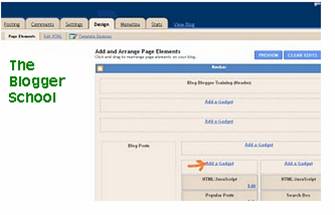
10.   Another easy way to add Google Adsense in Blogger sidebar go to www.blogger.com and then Dashboard, Design, Page Element and after that press “Add a Gadget” button in Sidebar option. For more information follow the picture given below.


11. After that click on  “Add a Gadget”  button and then go to HTML/JavaScript and copy Google Adsense code and paste it easily for information follow the picture has given below:


I think these two easy options to add Google Adsnese in Blogger Blog, if you have adjusted easily you can make money by Google Adsense easily.


This article will be very useful for new blogger owners and others, if you like it please leave your comments. 

Thursday, 24 March 2011

Secrets Google Adsense information for blogger

By this useful article about secrets of Google Adsense information is very useful for new blogger owners and  support about complete knowledge of Adsense. In my experience I have been reading lot of Blogs, Websites and also participated with forums about Google Adsense Secrets tricks and tips. In these days Google Adsense program is very popular in all over the world lot  of Books, Articles and other sources stuff published on the  topic of Google Adsense. To see this attention after long research I have found some secretes on Google Adsense now finally I have decided that it should be write for the help of  Blog owners . Now I describe some of the basic general things and move to the more precise topics regarding Google Adsense Secrets. Now read following 09 most useful points step by step guidance about Google Adsnese Secrecy. For more guidance read my useful article Google Adsense tips for  blogger. You can also read and take information like google adsense secrets download,google adsense blog, make money with google adsense, google adsense information,google adsense tutorial videos and adsense tips.


1.    General Position of Google Adsense

You can make your Blogger Blog about general topics. First off the ad targeting is much better. Secondly as you have a narrow focus your writing naturally becomes more expert in nature. Hopefully this makes you more authority in your field. If this is your first try at building Google Adsense Blog, make it about something you enjoy. It will make the procedure much easier and less painful to complete. You should though make sure that your topic has enough of an ad list and the payout is at a level you are easy with. Once you have gotten the postpone of how Google Adsense works on a Blog you are going to want to experiment in some high paying keywords, you may even be tempted to buy a high paying keyword list. This does come with some dangers. First off the level of fraud is much higher on the big money terms. Secondly there is a bend of the supply and demand relationship for these terms. Everyone wants ads on their Blog that make $40 or more a click, however the number of advertisers who are willing to pay that much is attractive limited. As well the competition for that traffic is going to be inflexible. So, do not attempt to run with the big dogs if you can not keep up. If you have to ask if you are a big dog, then chances are, you are not.This is reality is that keep simplicity and work hard it is key of success and keep away from fraudulent ways.

2.    Make New Blogs and its Maintenance

When you are building a new Blogs do not put Google Adsense on it until it is finished. In fact I would go even beyond and say do not put Google Adsense on it until you have built inbound relations and started getting traffic. This is often true for new files on existing Blogs, especially if the topic is new or different. It may take days or weeks for Google’s media bot to come back to your page and get the ads properly targeted. You like to build your Blogs using include files. You put the header, footer and navigation in common files. It makes it much easier to maintain and manage. You should be  like to put Google Adsense code in include files. If you need to modify my Google Adsense code, it is only one file.

3.    Managing URL’s and channels

Google Adsense channels are one area where it is really easy to go overboard with stats. You can set up URL channels to compare how one Blog is doing to another. You can also set up sub channels for each URL. If you wanted to you do something channels like this:

I.       domain1.com          =    728 banner
II.      domain1.com          =    336 block
III.     domain1.com          =     text link
IV.    domain2.com          =    728 banner
V.     domain2.com          =    image banner
VI.    domain2.com          =    336 block
VII.   domain3.com          =    300 block

While this is great for testing and knowing who clicks where and why, it makes your reporting a little.  Your total number will always be correct but when you look at your reports with a channel break down things will get displayed multiple times and not add up to correct total.

4.    Design your Blog and Combination

Once you recognize you are going to place Adsense on your Blogger Blog you are going to have to consider where to put it. If this is new site it is easier, if it is an existing site it is more difficult. While there are some people who will be able to do it in most cases I would say if you just slap the Adsense code in. For more help while every Blog  is different take help from this link properly http://www.google.com/support/adsense/bin/static.py?page=tips.html  showing the optimal locations. No surprise that the best spots are middle of the page and left hand side. Now I have done really well by placing it on the right, but you should know why  you are doing it that way before hand, and be prepared to change it if it does not work out.Google has also published a list of the highest performing ad sizes, look at the following with carefully:

1.    336×280 large rectangle
2.    300×250 inline rectangle
3.    160×600 wide skyscraper

From the Blogs that you run, You do really well with the 336 rectangle and 160 skyscraper. Your next best performing ad size  will be 728 leaderboard. You do not really use the 300 inline rectangle too often. So really it depends on how well you integrate these into your Blog. Another tip that can increase your CTR is by blending your Google Adsense into your Blogger Post body copy. For example if your Blogger Post Body copy is black, remove the Google Adsense border and make the title, text, and URL black. The one area where you have found blended ads do not  perform as well is forums, especially ones with a high volume of repeat members. Regular visitors develop banner blindness pretty quickly. One ‘tip’ to keep the ads from being ignored is to randomize the color and even the placement. As with any of the decisions about location, placement and color it is a trade off. How much do you emphasize the ads without annoying your visitors. For more information please read my useful articles how you add Google Adsense in Blogger Header and How you insert Google Adsense Below of the Post  are very useful and you an get more traffic to read these useful articles.

5.    Using of Images

One of the latest secrets to make the rounds is using images placed directly above or below Google Adsense leaderboard. This has been used for a while but came out in a digital point forum thread where a member talked about http://forums.digitalpoint.com/showthread.php?t=17104. Basically you set up Google Adsense code in a table with four images that line up directly with the ads. Whether or not this is misleading is fuzzy and very subjective. Obviously four blinking arrows would be ‘enticing people to click’ and be against the Googel Adsense TOS. However placing pictures of  laptops over laptops ads are not so use your best judgment here and look at it from the advertiser or Google’s perspective. If you have a question as to your implementation being over the line write to Google Adsense and ask them to take a look. As far as using the images, You have done it and can tell you it definitely works. You get the best results when the images complete the story the ads are telling. For example if you have ads about apple pies, use pictures of freshly baked apple pies, instead of granny smith, Macintosh, pink lady, and braeburn apples.

6.    Multiple Ad Units

One is very important method to boost ad revenue is to use multiple ad units. According to Google’s TOS you are allowed to post up to three ad units per page. Similar to standard search results the highest paying ad units will be served first and the lowest being served last. If there is enough of an ad inventory, place all three ad units. However you should pay attention to the payouts. Current assumption is you get 80% of the revenue on a $0.10 click you get $0.05). So if a click from the third ad unit is only paying between 3 to 5 cents you may want to omit it from your page. This is one are where giving your ad units channels does have value. If one ad unit is getting a higher percentage of click through you will  want to make sure the highest paying ads are being served there try and understand more and more. 


7.    Keep Adsense in RSS Feeds

With the growth of blogs and RSS feeds you are starting to see Google Adsense included in the RSS Feeds now. IMHO this does not work, and here is why:

i.      You only get to place one ad unit.
ii.     You have no control over finding the ‘sweet spot’ for the ad unit.
iii.    The ads are usually poorly targeted (this is getting better).
iv.     People develop ‘banner blindness’.

I know people like being able to read full postings in their feed reader, and there are at least a dozen other reasons for full posts from pleasing your users to mobile offline computing, all of which are completely valid.

8.    Affiliate Programs Sites

Placing Google Adsense on affiliate sites is tricky. Are you giving up a $10, $20, or $30 sale for a $1 click? This is something you have to test on your own to figure out. If you are not converting now it is definitely worth a try. I like to use Google Adsense on your article pages. For example I  say you that an affiliate website where you sold shoes. You are going to need some related articles to ‘flesh out’ the site. Things like getting a shoe shine’ or ‘finding a shoe repair shop’ these are excellent spots for Google Adsense.

9.    Avoid from unwanted Ads

You may encounter some unwanted ads inside the Adsense units of your Blog. It may be a competitor ad, irrelevant ad, non-kids-friendly ad etc. In Google Adsense, you are allowed to filter them by entering the respective URL into the "Competitive Ad Filter" inside your  Google Adsense account. The URL you enter should not be the one you see at the bottom of that ad. Also, there is no visible URL shown for certain ad formats like half banner. You must know that you are not allowed to click your ad, as it violates with the Google's TOS. In this case, you need to use the Adsense Preview Tool, in order to correct the URL of the unwanted ads. Copy that URL shown in the preview tool, and enter it into the filter. However, there are still some occasions that the ads still can not be screened. What to do then? Here are some tips. This is a very common mistake among most of the Google Adsense publishers. As you may know, Google's auction system automatically selects and displays the best performing (highest-paid) ads for each page to help you earn the most possible money. This is especially true with the expanded text ads too. By filtering ads you think are low paying, you could actually be cutting out the most optimized ads and decreasing your revenue potential. Each ad that is filtered is one less bid in the auction, lowering the price for the winning ad on your  Blogger Blog. You benefit most when there is a larger pool of advertisers competing for a place on your site. Hence, with the highest-paid ad gone, the replacing ad could not be even higher-paid. That means you earn much less. Furthermore, when calculating the auction in Adwords, Google takes ad clickthrough rates (CTR) into account - an ad with a $0.25 cost-per-click (CPC) with a 5% CTR is more valuable than an ad with a $1.00 CPC but a 0.1% CTR. Now keep in mind that there is relax in Google Adsense mistake if erroneously you have clicked your ad your account will be canceled.

I hope the above information regarding secrets of Google Adsense will be most useful for new blogger owners and others, if you like it please leave your comments.

Tuesday, 22 March 2011

Adding Google Adsense below of every blogger post

This useful article about  Adding Google Adsense below of every blogger post  is very profitable for new blogger owners. A lot of Blogger Blog users also use it. It is continuous conversation where to place these ads on your Blogger Blog for maximum publicity. The best ad places are around the header  of the  the posts or below the post titles. If you want to place your ad in Blogger header please read my useful article Adding Google Adsense in blogger Header  you can easily insert adsense in your sidebar as a gadget. But Blogger does not permit us to directly place the ads below post titles. The ads below post titles have established to be one of the most successful money making positions. So  why you are waiting?  Track this tutorial to insert Google Adsense ads below post titles and step by step suggestions is given below.

1.    Log in to your Google Adsense  account  by  going to http://google.com/adsense and  then    go to my ads tab and open ad units from the left side by expanding content link and then click new ad unit to create a new ad and select the size, type and color of your ad. For best results chose  300x280 is the best ad below of the post. You can also read about google adsense tips,google adsense pay,google adsense rates,adding google adsense,earn google adsense.

2.    Give your ad a remember-able name and ad a custom channel to track the ad performance. If you do not recognize anything about channels then leave that option.

3.    After filling required information, click  save  and get code button at the bottom of the page.   A pop-up window will appear with the ad code. Copy that code before pasting the ad code in Blogger, we must make it compatible with   Blogger  format. So  now  use  this   code converter
http://centricle.com/tools/html-entities/  paste the ad code and convert it. You will find the converted ad code in the bottom box there. Copy the converted ad code.

4.    Open your Blogger account and go to Design then Edit HTML tab and check Expand Widget Templates option and then press Ctrl + F  and find  this code: <data:post.body/> and also you will see code like this:

<div class='post-body entry-content'>
<data:post.body/>
<div style='clear: both;'/> <!-- clear for photos floats -->
</div>


5.    Paste the converted ad code just after the above code. The result would look something like this:

<script type="text/javascript"><!--
google_ad_client = "pub-6163461663318838";
google_ad_host = "pub-1556223355139109";
/* 336x280, created 2/26/11 */
google_ad_slot = "6571074824";
google_ad_width = 336;
google_ad_height = 280;
//-->
</script>
<script type="text/javascript"
src="http://pagead2.googlesyndication.com/pagead/show_ads.js">
</script>
 

6.    Click the "Preview" button to see the result  you will see ads below of the post titles instantly because sometimes adsense ads take some time to display have patience.

7.    After that save your template by clicking the "Save Template" button.

I hope this article  about how to add Google Adsense bottom of blogger post will very useful for new blogger owners, if you like it please leave your comments.